A few days ago, while reviewing some settings in my WhatsApp account, I came across an option I hadn't seen before: "Username". The odd part is that, at least in my case, WhatsApp showed no prior notification telling me I could reserve one. It simply appeared inside the account settings.
This matters because some people might get an in-app notice, while others might see nothing at all and only find the feature by going into settings manually. That's why I put together this step-by-step guide, based on my own experience, so you can check whether the option is already available on your WhatsApp and, if it shows up, reserve your username before someone else takes it.
Quick note: this feature is rolling out gradually, so it may not appear yet on every account, country, or app version.
What is a WhatsApp username?
A WhatsApp username is an @username-style identifier that will, going forward, let you share a way to be contacted without handing over your phone number directly.
For example, instead of saying "text me at this number," you could share your username instead. WhatsApp states that usernames are being rolled out gradually, and that in the meantime some people can reserve theirs before the full feature is available to everyone.
Source: Meta Newsroom — It's Time to Reserve Your WhatsApp Username
In my case, I reserved @etips.cl, but each user should try the name they want and check whether it's available — or even consider using the same username they already have on Instagram.
Before you start
To try reserving your username, check the following:
- Make sure WhatsApp is updated on your phone.
- Do this from the main mobile app, not from WhatsApp Web.
- Be patient if the option doesn't appear yet, since the rollout can be gradual.
- Think through the name you want to reserve, especially if it represents a brand, business, or personal project.
Step 1: open WhatsApp and tap the three-dot menu
From the WhatsApp main screen, tap the three vertical dots icon in the top-right corner.
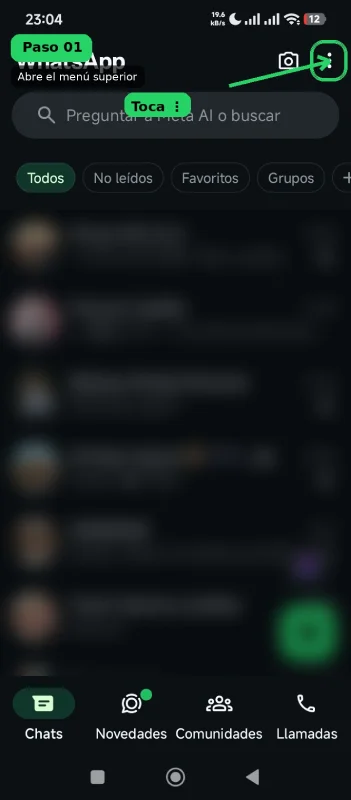
On Android, this menu is usually next to the camera icon. Tapping it opens a menu with several options.
Step 2: select "Settings"
In the dropdown menu, find the "Settings" option and tap it.
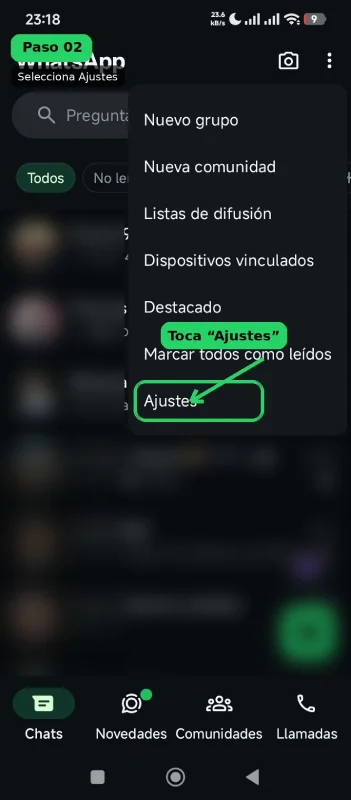
This step is key because the username reservation option doesn't show up directly on the main screen — it's tucked inside your account settings.
Step 3: go to the "Account" option
Inside Settings, tap the "Account" option.
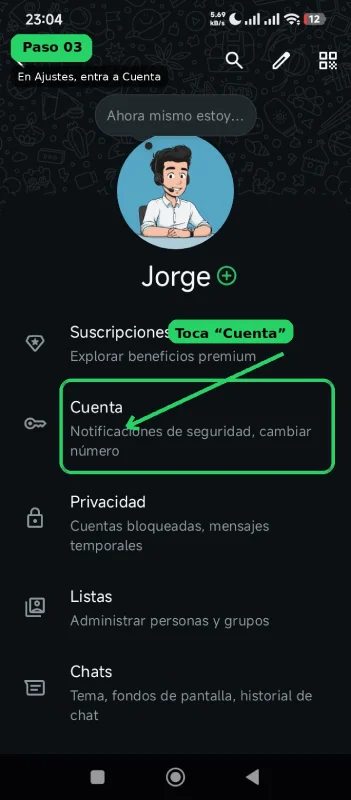
This section groups options related to security, phone number, two-step verification, and, if it's already enabled for your account, the username option.
Step 4: tap "Username"
Once inside Account, find the "Your account" section and tap "Username".
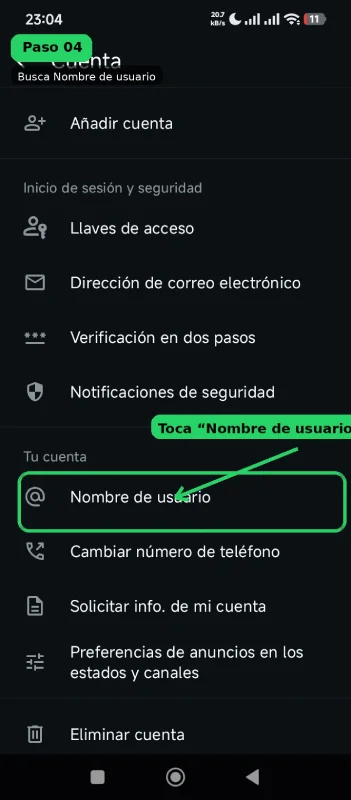
If you don't see this option, the feature is probably not yet available for your account or app version. In that case, it's worth updating the app and checking again later.
Step 5: tap "Create username"
WhatsApp will show a screen explaining that usernames will be available soon and that you can reserve yours. Tap the "Create username" button.
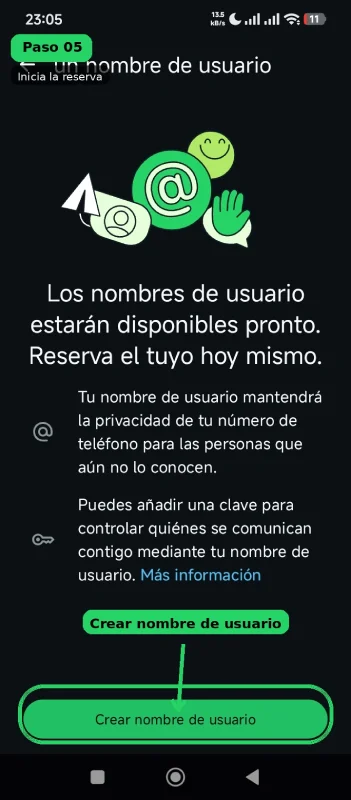
On this same screen, WhatsApp also mentions that your username will help protect your phone number's privacy from people who don't know it yet.
Step 6: type the username you want to reserve
Now type the username you'd like to reserve.
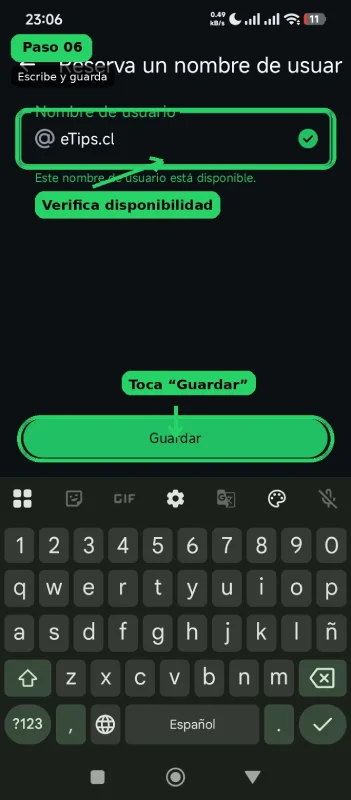
WhatsApp will tell you whether the name is available. If it shows as available, tap "Save". In my case I tried eTips.cl and the app showed it as available. I then confirmed the reservation.
Step 7: confirm the reservation went through
After saving, WhatsApp will show a confirmation screen stating that you reserved your username.
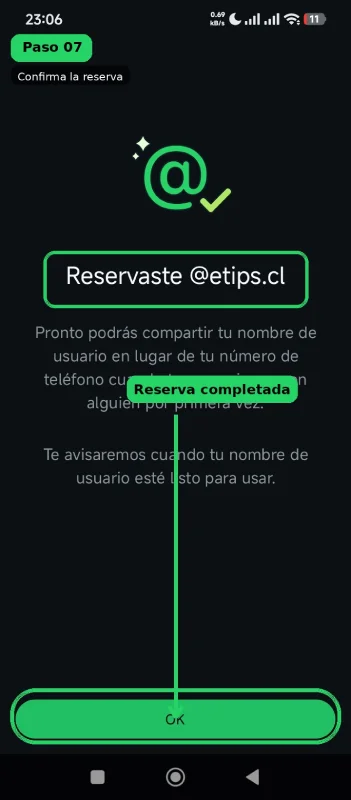
This screen also notes that soon you'll be able to share your username instead of your phone number the first time you reach out to someone.
Step 8: check that the username shows up on your profile
Back on the Settings screen, you should see your username underneath your profile name.
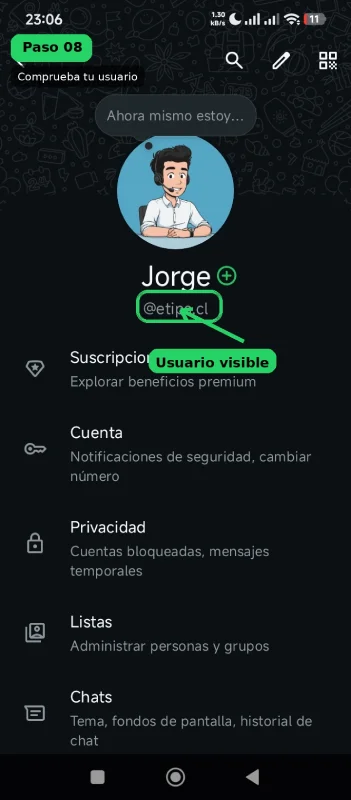
This confirms the reservation is now tied to your account.
What if the option doesn't show up for me?
If you can't find Account > Username, that doesn't necessarily mean something's wrong with your account. It could be due to several reasons:
- The feature hasn't reached your account yet.
- Your WhatsApp app isn't up to date.
- The rollout is happening in stages.
- The feature may vary by country, operating system, or account type.
In my case, again, I got no special notice at all — I found it by chance while checking my settings. That's why I think it's worth checking manually, especially if you want to secure a name that matters for your brand, business, or digital identity.
Source: WhatsApp Help Center — About username reservations
Tips before reserving your username
If you're going to reserve a WhatsApp username, it's worth thinking it through before you choose it.
For a personal account, you can use something recognizable, without exposing more information than necessary. For a company, brand, or project, it's best to try reserving a name consistent with your other digital channels, such as Instagram, Facebook, TikTok, YouTube, or your website domain.
It's also a good idea to avoid names that are too long, hard to type, or easy to confuse with something else. In eTips' case, using @etips.cl makes sense because it's aligned with the domain and the brand's identity.
Does this replace my phone number?
For now, not entirely.
WhatsApp still runs on phone numbers, but the username is aimed at improving your privacy whenever you need to share a way to be contacted with people who don't know your number yet.
The idea is that, in the future, you'll be able to use your username as a more controlled way to start conversations, especially in contexts where you don't want to publish or hand over your personal number directly.
Source: WhatsApp Help Center — About usernames
Conclusion
Reserving a username on WhatsApp looks like a small feature on the surface, but it can matter a lot for the privacy and digital identity of people, businesses, and brands.
What's interesting is that not everyone will necessarily find out through a notification. In my case, the feature appeared quietly inside the settings, and I found it while checking other account options.
So if you use WhatsApp professionally, run a brand, or simply want to secure your identifier, I'd recommend manually checking this path:
WhatsApp > Three-dot menu > Settings > Account > Username
If the option is already there, you can reserve your name in just a few seconds.
Prefer to save this guide?
You can also download this manual as a PDF to keep or share it.
Download the PDF guideSources consulted: WhatsApp Help Center — How to create and manage your username, WhatsApp Help Center — About username reservations, WhatsApp Help Center — About usernames, Meta Newsroom — It's Time to Reserve Your WhatsApp Username, The Verge — WhatsApp is launching usernames: here's how to reserve yours.