On October 2 we received an email from AFP ProVida, one of Chile's largest pension fund administrators, with the subject line «Aviso Ingreso Reclamo» (Complaint Filed Notice). It accused us of failing to pay the pension contributions of several employees, mentioned accumulated interest and closed with a warning about legal debt collection. To see the details of the alleged case file, you had to click a link.
It was a scam, but the email was not fake: it was sent by ProVida's own system, from its own domain. The scammers did not need to impersonate the pension fund: our analysis of the email points to abuse of the complaint form the company keeps open to the public.
If your company has a public web form that automatically replies by email and includes in that reply what the person wrote, the same thing could happen to you.
The email we received
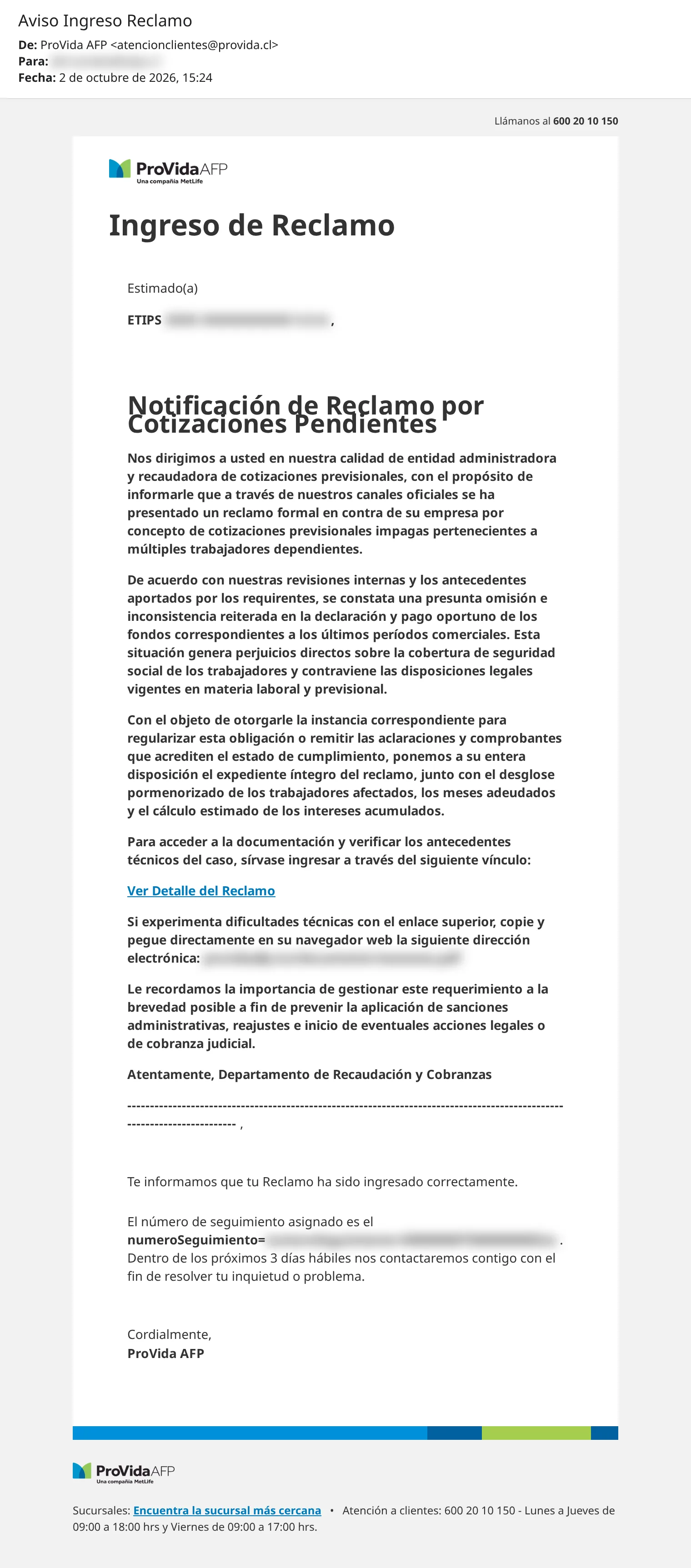
At first glance, nothing looks out of place. The sender is atencionclientes@provida.cl, the logo is ProVida's, the customer service phone number is the real one and the footer links to the branch network. The text is well written, uses the vocabulary of a collection letter and appeals to something every employer takes seriously: their employees' pension contributions.
The «Ver Detalle del Reclamo» (View Complaint Details) link does not go to provida.cl. It points to a domain that mimics the pension fund's name with a .icu ending, to a file presented as a PDF. We did not open it. We looked up the domain's public registration record without visiting it: it was created on October 1, one day before the email reached us, and when we checked it on October 10 it had already been suspended.
Why it passed the email checks
Email services such as Gmail or Outlook check three things to decide whether a message really comes from who it claims to be. They verify that the sending server is authorized by the domain (SPF), that the message carries a digital signature from that domain and was not altered along the way (DKIM), and that both match the address the recipient sees (DMARC). If they fail, the email may end up in spam or be rejected, depending on how the domain has configured it.
This email passed all three. It left from the servers of MetLife, the company that owns ProVida, signed with the provida.cl key. That confirms who sent it, but says nothing about what it contains: authenticating the sender does not guarantee that the content is safe. Other controls, such as the link scanning some filters perform, can still detect a message like this or its link.
Almost all the usual advice («check the sender», «be wary of strange domains») assumes the scammer is impersonating someone. With this email, checking the sender would not have been enough.
How a complaint form becomes a phishing channel
ProVida, like many companies, has a web form for filing complaints. When someone fills it in, the system sends a confirmation email to the address provided: «Estimado(a) [name], te informamos que tu reclamo ha sido ingresado correctamente» (Dear [name], we confirm that your complaint has been received).
The problem appears when that email includes, word for word, what the person typed into the form. If the system does not check that content, nothing stops someone from writing an entire letter there, with headings, paragraphs and links, instead of a name. All it takes is entering the victim's email as the contact address. The system builds the confirmation, drops the letter into the greeting and sends it with the company's signature.
We have no access to ProVida's systems, so we cannot confirm the details, but our analysis of the email points to this kind of abuse. The seam is visible in the screenshot: the entire «Notificación de Reclamo por Cotizaciones Pendientes» (Complaint Notice for Unpaid Contributions) sits inside the greeting, right after «Estimado(a)». The line of dashes at the end pushes down the template's real text, which is still there: «Te informamos que tu Reclamo ha sido ingresado correctamente».
Choosing the victim is not hard either: a company's legal name and email address are usually public.
Your form carries the same risk
This is not a problem unique to pension funds or complaint forms. The risk appears when a system meets two conditions: it sends emails to an address nobody has verified, and that email includes content written by whoever filled in the form. An automatic reply with fixed text, which repeats nothing that was entered, does not carry the same risk.
Those two conditions show up in very common places. Contact forms with a «send me a copy» option send the sender their own message, and the sender can be anyone. Account sign-ups greet the user by name in the welcome email. Quote requests, booking requests and event or newsletter sign-ups often confirm with a summary of the data entered. In every case, whoever controls the text and the destination address can use the company's system as if it were their own.
The damage does not stop with the recipient. If your domain starts sending phishing, email providers may lower its reputation, and then your legitimate emails (invoices or password resets) start landing in spam, and the name that appears in the scam is your company's.
How to close the gap
Treat user input as plain text
If the confirmation email is HTML, the content entered by the user has to be escaped before it is inserted, so that an <a> tag is shown as text and never as a link. Most programming languages and template engines have a function for this; the problem is usually in hand-built email templates, which nobody reviews as carefully as the website.
Strip tags and links from the message
Escaping HTML does not solve everything. An address written as plain text, without tags, still arrives in the copy, and most email clients, such as Gmail or Outlook, turn it into a clickable link on their own. That is why it is worth reviewing the requester's message and removing tags and links to external sites before including it in any email. If the form really needs to receive links, like a support form where the customer pastes the address of the page that is failing, the link can reach your team, but there is no need to send it back to the requester in the confirmation.
Don't repeat what the requester wrote
Does the confirmation need to repeat anything? A «We received your complaint, number 12345» does the same job as a personalized greeting and leaves the attacker no room. If the name has to appear, it helps to limit its length and the allowed characters: a real name does not need 2,000 characters or the < and > signs.
Limit the volume
A captcha or a limit on submissions per address and per IP will not prevent an isolated case, but it will stop someone from using the form to send thousands of emails. Reviewing submitted forms from time to time, looking for links or HTML where a name should be, makes it possible to detect abuse before a third party reports it.
Publish a security contact
Publishing a security contact helps whoever spots the problem to let you know. There is a standard for this, the security.txt file, which tells people whom to write to. When we tried to alert ProVida, we could not find that channel.
If you are the one receiving the email
These signs apply to any email, even when the sender is genuine. The first four appeared in this case:
- The link goes to a different domain. Before clicking, hover over the link (or press and hold it on your phone) and look at the real address.
- The content does not fit the type of email. An automatic confirmation that suddenly contains a collection letter, or that confirms a request you never made.
- Urgency and threats. Penalties, interest and legal collection in the same email that asks you to click right away.
- An important document behind a link. A serious institution does not usually send collection documents hosted on an external site: normally you would see them inside its official website.
- You are asked for personal data or your username and password. That is not normally done by email.
If in doubt, do not use any information from the email to verify it. Go to the institution's website by typing the address yourself, or call the number listed on its official site. For pension contributions in Chile, you can check Previred (the platform employers use to pay them) or the AFP's website to see if anything is pending.
In this article we do not publish the link or the technical details that would allow the abuse to be repeated: until the form is fixed, anyone could use it again. Nor are we trying to accuse ProVida of bad practices. We tell this story so that people are careful with the emails they receive and, above all, so that companies adopt good practices against situations that could put their brand at risk without them knowing.